Broken links and out-of-stock products
How to find broken Amazon affiliate links (4 ways, free to automatic)
A broken Amazon link rarely looks broken. The page loads and Amazon opens, but the product can't be bought or the sale isn't credited to you. Here is how to find every one of them, from a free afternoon audit to a check that runs itself.
What "broken" means for an Amazon link
Most website owners think of a broken link as a 404 error. Amazon links almost never break that way. They break in five quieter ways, and each one costs money differently.
| What went wrong | What the reader sees | What you lose |
|---|---|---|
| Out of stock | "Currently unavailable" | The sale, unless they buy something else within 24 hours |
| No offer to buy | A product page with no Buy button, or only third-party offers | Usually the sale |
| Removed or mistyped ASIN | "Looking for something? We're sorry…" | The click is wasted |
| Missing or wrong tracking ID | A normal, working product page | Every sale through that link |
| Short link leads nowhere | An Amazon error or the home page | The click is wasted |
The fourth row is the one that hurts most, because nothing looks wrong. Readers buy, Amazon ships, and the commission goes to nobody or to someone else.
Method 1: a manual audit (free, slow)
Good for a small site or a first look at your top pages.
- List your money pages. In Google Search Console, open Performance → Pages, sort by clicks and export. Your top 20 pages are usually most of your Amazon income.
- Open each page and click each Amazon link in a private window, so your own Amazon session doesn't change what you see.
- Check three things on the Amazon page: is there an Add to Cart button sold by Amazon or a reputable seller; is it the product your text describes; and is your tag in the address bar.
- Note the fixes in a spreadsheet: page, link text, ASIN, problem, replacement.
A 20-page audit takes an afternoon. The weakness is time: stock changes every day, so the audit is out of date by next week.
Tip: Checking tags by eye is error-prone. Paste each page's HTML into the free Amazon affiliate link checker and it lists every missing, foreign or broken tag in seconds.
Method 2: check tags and formats in bulk (free, fast)
Tracking ID problems can be found without Amazon at all, because they're visible in the link. Paste a page's source (Ctrl+U in your browser, then select all) or a list of links into the link checker. It flags:
- links with no tag;
- links with a tag that isn't yours, if you list your tags;
- a tag placed after a second "?", which Amazon ignores (see Amazon affiliate link format);
- a tag from the wrong store, such as a UK tag on an amazon.com link;
- amzn.to short links, which hide the product and tag until you open them.
Amazon has its own link checker in Associates Central, but Amazon's help pages note that it only checks the tagging for a URL linking to Amazon.com, and that it doesn't work correctly with links copied from Associates Central or SiteStripe. It also checks one link at a time.
Method 3: export and check in a spreadsheet (free, technical)
If you're comfortable with a crawler, you can extract every outbound Amazon link from your site and review it in bulk.
- Crawl your site with a desktop SEO crawler and export all outbound links containing
amazon.oramzn.to. - Pull the ASIN out of each URL with a formula, or paste the column into the ASIN lookup to get a clean list.
- Count how many pages use each ASIN. A product used on 15 pages deserves attention first.
This tells you where each product is used, but still not whether it's in stock. For that you need Amazon's data.
Method 4: automatic daily checks through Amazon's API
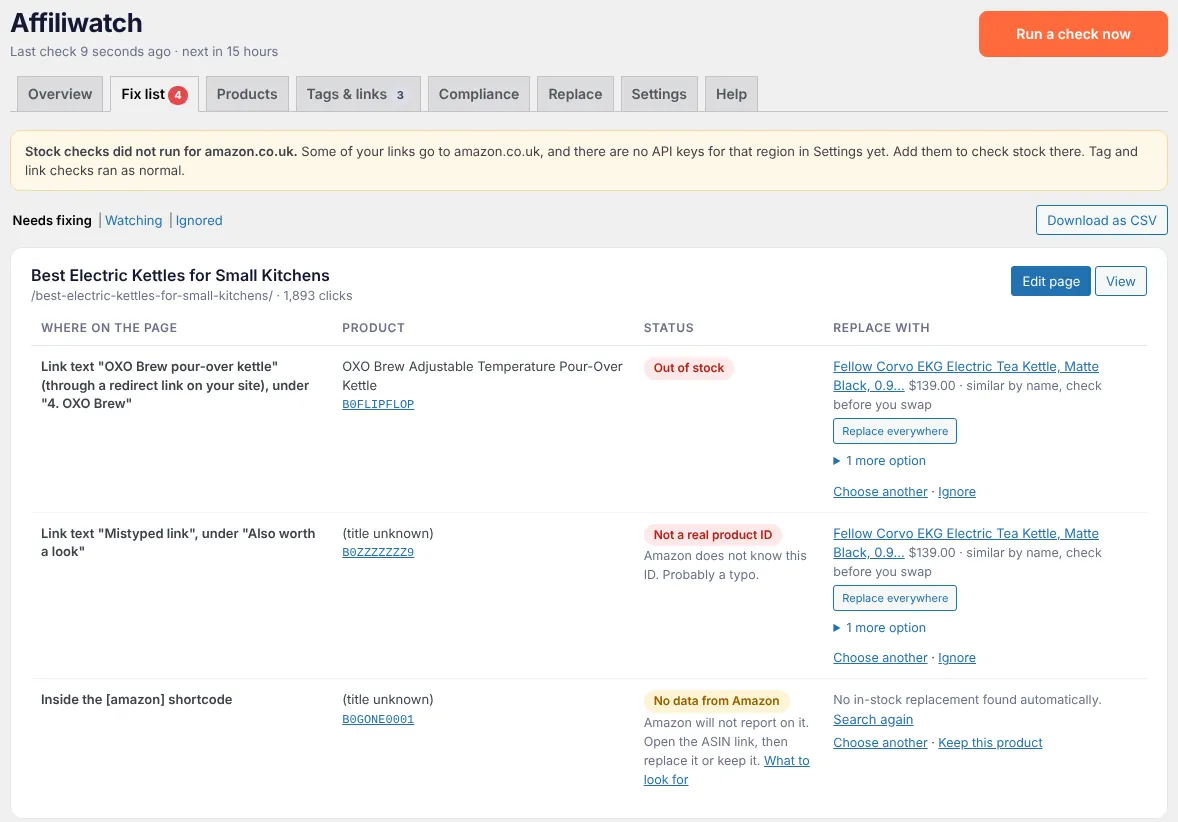
Stock, seller and product status come from Amazon's Creators API, the official way for Associates to read product data. Amazon's policies don't allow scraping product pages, and scrapers break and get blocked anyway.
An automatic checker does four things a manual audit can't:
- checks every product, every day, ten products per API request;
- waits before alerting, because many products come back within days;
- ranks problems by page traffic, so the top pick on your busiest roundup comes first;
- suggests replacements, starting with other sizes and colours of the same product.
That's what Affiliwatch does, on WordPress and on Next.js, Astro, Hugo and static sites. Other options, including Lasso and Affilimate, are compared in the best Amazon affiliate link checkers.
What to fix first
Not every broken link is worth the same. Work in this order:
- Missing or wrong tracking IDs on busy pages. Every sale through them is lost, and the fix takes a minute.
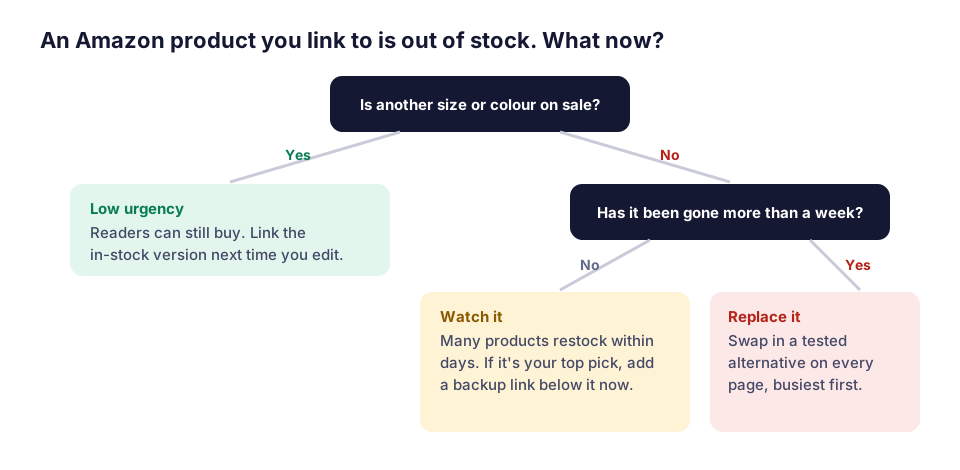
- Top picks that are out of stock or removed. The first product in a roundup gets most of the clicks.
- Mistyped ASINs. The reader lands on an error page; fix the typo.
- Products out of stock for more than a week on other pages.
- One size or colour out while others are on sale. Readers can still buy, so this can wait until you next edit the page.
The out-of-stock guide explains how to choose a replacement that converts.
How to stop it happening again
- Use one tag per site (or per page type) so a wrong tag stands out. See Amazon tracking IDs.
- Build links with SiteStripe or a generator, not by editing URLs by hand. The link generator makes clean
/dp/ASIN?tag=links. - Keep a backup pick under each top recommendation, so one dead product doesn't empty the page.
- Check on a schedule. Monthly is the minimum for a manual audit; daily is what stock really needs.
Questions people ask
How do I know if my Amazon affiliate link is working?
Does Amazon tell me when a product I link to goes out of stock?
Can a normal broken link checker find out-of-stock Amazon products?
How often should I check my Amazon links?
Sources
Checked on November 17, 2026. Amazon changes its terms from time to time; the linked pages are the final word.