Amazon tracking ID: how to find it, create more, and use it right
Your tracking ID is the small piece of every Amazon link that says who gets paid. Get it wrong and the sale still happens, just not for you. This guide covers finding it, creating more, and checking your links use the right one.
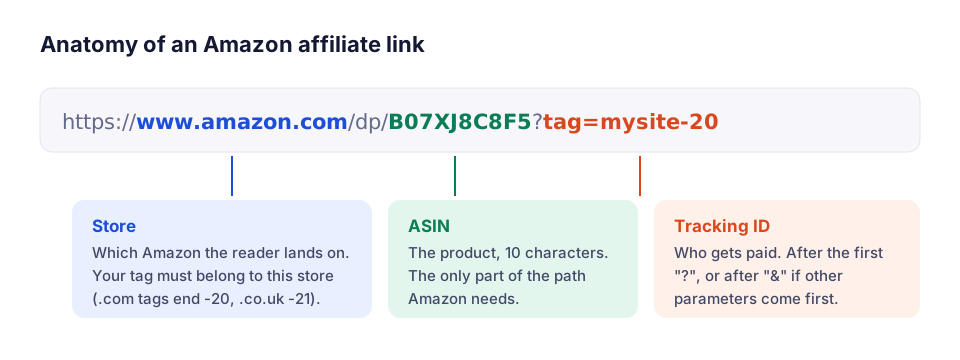
What a tracking ID is
A tracking ID is the code Amazon uses to credit a sale to you. It travels in the link as the tag parameter:
https://www.amazon.com/dp/B07XJ8C8F5?tag=mysite-20
                                         ^^^^^^^^^
When a reader clicks that link, Amazon records the click against mysite-20. If they buy within the 24-hour window, the commission goes to the account that owns that tracking ID, and the report shows it under that ID.
Store ID vs tracking ID
| Store ID (Associate ID) | Extra tracking IDs | |
|---|---|---|
| Created | When you join the program | Whenever you add one |
| How many | One per account | Up to 100 per account, per Amazon's help pages |
| Pays into | Your account | The same account |
| Use | Default for all your links | Separate reporting per site, page type or channel |
Both are tracking IDs as far as a link is concerned. The difference is reporting: Amazon's reports can be filtered by tracking ID, so separate IDs show which site or campaign earned what.
How to find your tracking ID
- Sign in to Associates Central for the store you joined (for example affiliate-program.amazon.com for the US).
- Click your email address at the top right.
- Choose Manage Your Tracking IDs. Every ID on the account is listed.
You can also see your current ID in the SiteStripe bar at the top of Amazon when you're signed in with your Associates account, and in any link SiteStripe builds. How SiteStripe works.
How to create another tracking ID
- Open Manage Your Tracking IDs.
- Click Add Tracking ID.
- Type a name. Amazon adds the store suffix (such as
-20) and checks it's available. - Use it in SiteStripe by picking it from the tracking ID menu before you copy a link.
New IDs show in reports once they have clicks.
How to use tracking IDs well
- One per site. If you run several sites, give each its own ID. A link copied from one site to another then shows up as "not yours" in a link check, which is exactly the mistake you want to catch.
- One per channel. Website, YouTube, newsletter and social links each get their own ID, so you see which channel earns.
- Don't go granular for its own sake. A tracking ID per article sounds attractive, but Amazon's reports only become useful with enough clicks per ID. Most sites do better with a handful.
Mistakes that cost commission
| Mistake | What happens | How to spot it |
|---|---|---|
| No tag at all | Amazon can't credit the sale | Links built by copying the browser address |
| Someone else's tag | The sale goes to them | Links copied from another site or an old template |
| A tag from another store | A UK -21 tag on amazon.com earns nothing in the US program | Tag suffix doesn't match the store |
| Tag after a second "?" | Amazon ignores it | ?ref=…?tag=… in the link |
| Two different tags | Only one counts, maybe not yours | tag= appears twice |
| Retired tag | Links still work, reports get confusing | Old IDs you no longer track |
All of these are visible in the link itself. Paste a page or a list of links into the free Amazon affiliate link checker, add your own tracking IDs, and it lists every link with a missing, foreign or misplaced tag.
Tracking IDs in other countries
Each Amazon store runs its own Associates program with its own tracking IDs. A US ID doesn't earn on amazon.co.uk. If you send readers to several stores, join each program you need, use the matching ID in each link, and keep a list of which ID belongs to which store.
Affiliwatch lets you list tags per store, for example mysite-21 = amazon.co.uk, so a link to the UK store carrying a US tag is reported as a problem.
Check every link, not just new ones
Most tag mistakes are old: a template from years ago, a link copied from another site, a plugin that added the tag in the wrong place. A one-time check of your whole site usually finds a few. How to find broken Amazon affiliate links covers the full audit.
Questions people ask
Where do I find my Amazon tracking ID?
What is the difference between a store ID and a tracking ID?
How many tracking IDs can I have?
Why does my tracking ID end in -20?
Can I delete a tracking ID?
Sources
Checked on November 17, 2026. Amazon changes its terms from time to time; the linked pages are the final word.